

All website hosting plans include a FREE Drag and Drop website builder
Checking Port 25
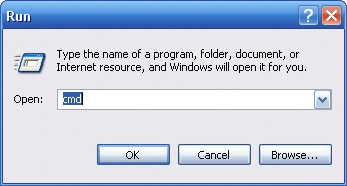
On a Windows PC Click on the Start menu button, usually located at the lower left corner of the screen. There is a tab called "Run". Click it and a new window will pop up. In the text field of this window you need to type cmd and then press the "Enter" key.
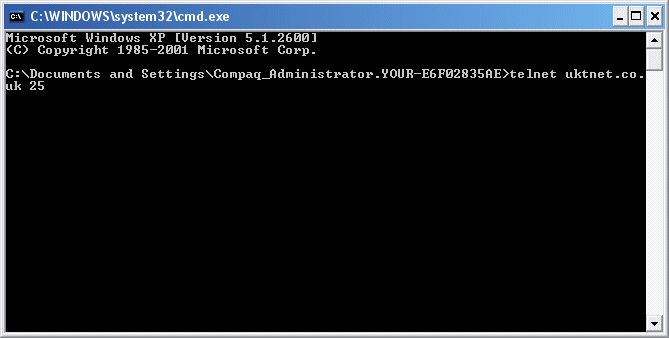
Another window will open. It is the so called "MS-DOS prompt" or "command prompt". Just type the following command in the command prompt window and press "Enter":
telnet my-domain-name.com 25 (my-domain-name.com is YOUR domain name)
On a MAC Each Mac OS is delivered with a preinstalled terminal emulator. The terminal is a tool which allows you to execute commands from the command line. Usually, the terminal is located under your Mac HD -> "Applications" directory -> Utilities sub-directory. When the window opens, you will see a command line with a flashing cursor on it so you can start typing right away. Just type the following command and press "Enter":
telnet my-domain-name.com 25 (my-domain-name.com is YOUR domain name)
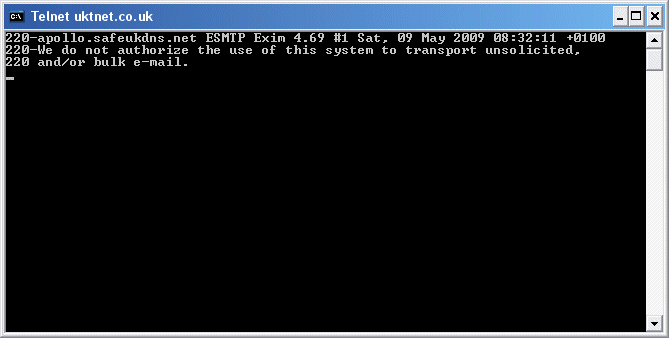
TEST RESULTS In both cases, if the test is successful you should get a response similar to... 220 my-domain-name.com ESMTP... (plus other info like date etc appended to the result)
The reason why many ISPs block the default SMTP port 25 is because it can be used for sending unsolicited emails if the host PC (or MAC) has a virus or malware inside a program or application is sending email without your knowledge.
